
Applicable To
- USB2-MICRO-250X, Plugable Digital Viewer for Windows
When configuring the maximum video file size in Plugable Digital Viewer, entering 4097 MB as shown in the software results in the error message "Video size setting is incorrect; out of range." This is caused by a typo in the displayed limit, and the maximum supported file size is 4096 MB.
Troubleshooting Steps
- Open Plugable Digital Viewer.
- Open the Settings menu.
- Locate the Movie Setup section.
- Enter 4096 MB or lower in the Maximum File Size field.
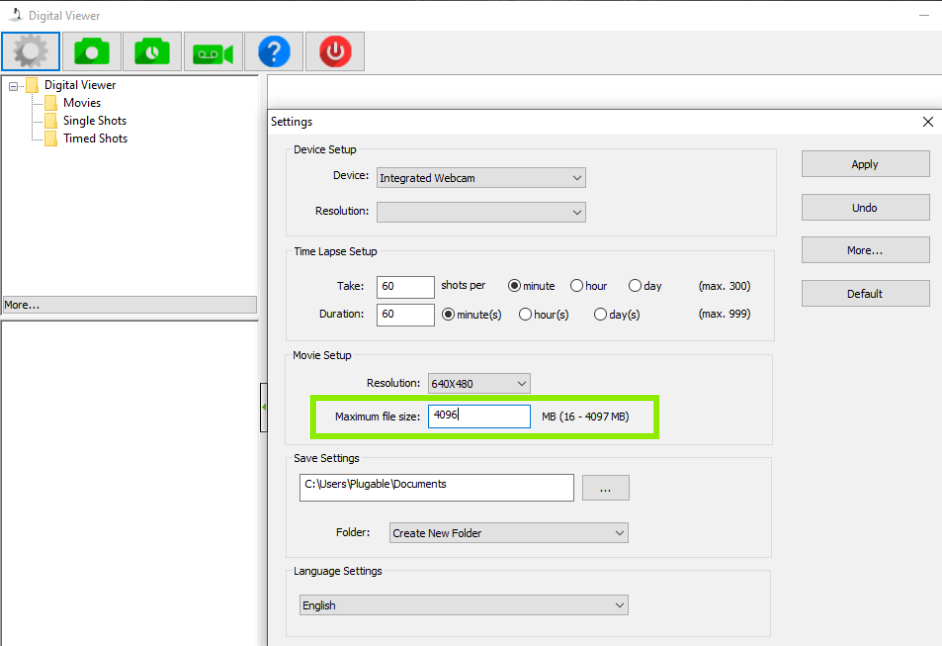
- Select Apply to save the change.
Expected Result
Plugable Digital Viewer should accept the maximum file size setting without displaying the "Video size setting is incorrect; out of range" error. The maximum supported setting is 4096 MB.
If the Issue Persists
If Plugable Digital Viewer continues to display an error after setting the maximum file size to 4096 MB or lower, contact Plugable Support at support@plugable.com.
